Python is a popular programming language. Created by Guido van Rossum- released in 1991
It is used for-
Web development (server-side)
Software development
Mathematics
System Scripting.
What can Python do?
Python can be used on a server to create web applications.
Python can be used alongside software to create workflows.
Python can connect to database systems. It can also read and modify files.
Python can be used to handle big data and perform complex mathematics.
Python can be used for rapid prototyping, or for production-ready software development.
Why Python?
Python works on different platforms (Windows, Mac, Linux, Raspberry Pi, etc).
Python has a simple syntax similar to the English language.
Python has syntax that allows developers to write programs with fewer lines than some other programming languages.
Python runs on an interpreter system, meaning that code can be executed as soon as it is written. This means that prototyping can be very quick.
Python can be treated in a procedural way, an object-oriented way or a functional way.
Good to know
The most recent major version of Python is Python 3, which we shall be using in this tutorial. However, Python 2, although not being updated with anything other than security updates, is still quite popular.
In this tutorial Python will be written in a text editor. It is possible to write Python in an Integrated Development Environment, such as Thonny, Pycharm, Netbeans or Eclipse which are particularly useful when managing larger collections of Python files.
Python Syntax compared to other programming languages
Python was designed for readability, and has some similarities to the English language with influence from mathematics.
Python uses new lines to complete a command, as opposed to other programming languages which often use semicolons or parentheses.
Python relies on indentation, using whitespace, to define scope; such as the scope of loops, functions and classes. Other programming languages often use curly-brackets for this purpose.
W3School Python Tutorial- Syntax
Execute Python Syntax
Python syntax can be executed by writing directly in the command line:
>>> print("Hello, World!")
Hello, World!
Or by creating a python file on the server, using the.py file extension, and running it in the Command Line:
C:UsersYour Name>python myfile.py
Python Indentation
Indentation refers to the spaces at the beginning of a code line.
Where in other programming languages the indentation in code is for readability only, the indentation in Python is very important.
Python uses indentation to indicate a block of code.
Python will give you an error if you skip the indentation:
Example:
if 5 > 2:
print("Five is greater than two!")
The Correct way to write this code is;
Example:
if 5 > 2:
print("Five is greater than two!")
The number of spaces is up to you as a programmer, the most common use is four, but it has to be at least one.
Python Variables
In Python, variables are created when you assign a value to it, Python has no command for declaring a variable:
Example:
x = 5
y = "Hello, World!"
Comments
Python has commenting capability for the purpose of in-code documentation.
Comments start with a #, and Python will render the rest of the line as a comment:
Example:
#This is a comment
print("Hello, World!")
W3School Python Tutorial- Comments
Creating a Comment
Comments start with a #, and Python will ignore them:
#This is a comment
print("Hello, World!")
Comments can be placed at the end of a line, and Python will ignore the rest of the line:
print("Hello, World!") #This is a comment
A comment does not have to be text that explains the code, it can also be used to prevent Python from executing code:
#print("Hello, World!")

print("Cheers, Mate!")
Multiline Comments
Python does not really have a syntax for multiline comments.
To add a multiline comment you could insert a # for each line:
#This is a comment

#written in

#more than just one line

print("Hello, World!")
Or, not quite as intended, you can use a multiline string.
Since Python will ignore string literals that are not assigned to a variable, you can add a multiline string (triple quotes) in your code, and place your comment inside it:
"""

This is a comment

written in

more than just one line

"""

print("Hello, World!")
As long as the string is not assigned to a variable, Python will read the code, but then ignore it, and you have made a multiline comment.
Variables that are created outside of a function (as in all of the examples above) are known as global variables.
Global variables can be used by everyone, both inside of functions and outside.
x = "awesome"


def myfunc():

  print("Python is " + x)


myfunc()
If you create a variable with the same name inside a function, this variable will be local, and can only be used inside the function. The global variable with the same name will remain as it was, global and with the original value.
x = "awesome"


def myfunc():

  x = "fantastic"

  print("Python is " + x)


myfunc()


print("Python is " + x)
Output:
Python is fantastic
Python is awesome
The global Keyword
Normally, when you create a variable inside a function, that variable is local, and can only be used inside that function.
To create a global variable inside a function, you can use the global keyword.
def myfunc():

  global x

  x = "fantastic"


myfunc()


print("Python is " + x)
Also, use the global keyword if you want to change a global variable inside a function.
x = "awesome"


def myfunc():

  global x

  x = "fantastic"


myfunc()


print("Python is " + x)
W3School Python Tutorial- Data Types
Built-in Data Type
In programming, data type is an important concept.
Variables can store data of different types, and different types can do different things.
Python has the following data types built-in by default, in these categories:
Text Type:
str
Numeric Types:
int, float, complex
Sequence Types:
list, tuple, range
Mapping Type:
dict
Set Types:
set, frozenset
Boolean Type:
bool
Binary Types:
bytes, bytearray, memoryview
None Type:
NoneType
Getting the Data Type
You can get the data type of any object by using the type() function:
x = 5

print(type(x))
Output:
<class 'int'>
Setting the Data Type
In Python, the data Type is set when you assign a value to a variable:
Example
Data Type
x = "Hello World"
str
x = 20
int
x = 20.5
float
x = 1j
complex
x = ["apple", "banana", "cherry"]
list
x = ("apple", "banana", "cherry")
tuple
x = range(6)
range
x = {"name" : "John", "age" : 36}
dict
x = {"apple", "banana", "cherry"}
set
x = frozenset({"apple", "banana", "cherry"})
frozenset
x = True
bool
x = b"Hello"
bytes
x = bytearray(5)
bytearray
x = memoryview(bytes(5))
memoryview
x = None
NoneType
Setting the Specific Data Type
If you want to specify the data type, you can use the following constructor functions:
Example
Data Type
x = str("Hello World")
str
x = int(20)
int
x = float(20.5)
float
x = complex(1j)
complex
x = list(("apple", "banana", "cherry"))
list
x = tuple(("apple", "banana", "cherry"))
tuple
x = range(6)
range
x = dict(name="John", age=36)
dict
x = set(("apple", "banana", "cherry"))
set
x = frozenset(("apple", "banana", "cherry"))
frozenset
x = bool(5)
bool
x = bytes(5)
bytes
x = bytearray(5)
bytearray
x = memoryview(bytes(5))
memoryview
W3School Python Tutorial- Python Numbers
Python Numbers
There are three numeric types in Python:
int
float
complex
Variable of numeric types are created when you assign a value to them:
x = 1 # int
y = 2.8 # float
z = 1j # complex
To verify the type of any object in Python, use the type() function:
print(type(x))
print(type(y))
print(type(z))
Output:
<class 'int'>
<class 'float'>
<class 'complex'>
Int
Int, or integer, is a whole number, positive or negative, without decimals, of unlimited length.
Float
Float, or "floating point number" is a number, positive of negative, containing one or more decimals.
Float can also be scientific numbers with an "e" to indicate the power of 10.
Complex
Complex numbers are written with a "j" as the imaginary part:
x = 3+5j

y = 5j

z = -5j


print(type(x))

print(type(y))

print(type(z))
W3School Python Tutorial- Python Casting
Specify a Variable Type
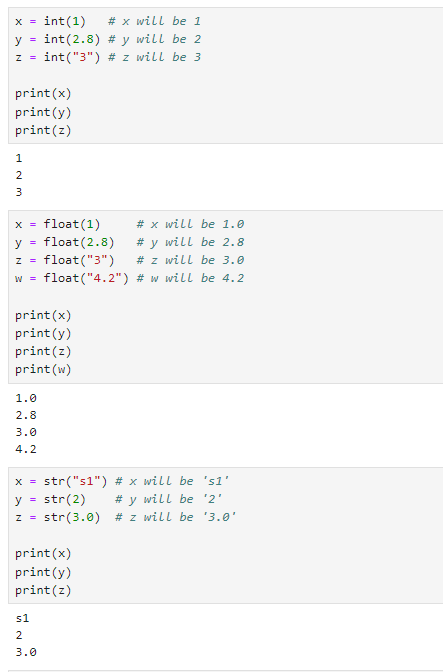
There may be times when you want to specify a type to a variable, this can be done with casting.
Python is an object-orientated language, and as such it uses classes to define data types, including its primitive types.
Casting in python is therefore done using constructor functions:
int() - constructs an integer number from an integer literal, a float literal (by removing all decimals), or a string literal (providing the string represents a whole number)
float() - constructs a float number from an integer literal, a float literal or a string literal (providing the string represents a float or an integer)
str() - constructs a string from a wide variety of data types, including strings, integer literals and float literals